Case Study · 2025–Apr. 2026
Logistics Management Platform
A logistics management platform built solo from scratch to replace disconnected Excel spreadsheets and end-of-week email updates with a centralized, real-time system that gives MMS Logística full operational control and their client live visibility into every shipment. Currently live and processing ~400 shipments per week.
01 — Overview
MMS Logística is a logistics company that serves a pharmaceutical distribution client, moving products to pharmacies across Argentina. The project came in through a referral and became a paid contract. A team of fewer than five managed all operations using Excel spreadsheets and even pen and paper at times. This was the cause of the core problem: the client had no way to know the real-time status of any shipment MMS was handling, and recipients got no notice that a delivery was coming. MMS Logística would send the Excel files with the updates to the client at the end of the day, or sometimes at the end of the week. With multiple employees working on separate files, this led to coordination failures and data loss. The pharmaceutical client pushed for a technological upgrade.
I designed and built the entire platform from scratch as the sole developer, with the core completed in 3 months. A business partner led the initial requirements gathering with MMS and owned all communication with the pharmaceutical client, coordinating their workflow, delivering updates and managing the testing rollout. I handled solution design, demoed the platform, and walked MMS Logística through new features as I built them. The platform now handles ~400 shipments per week across a fleet of 11 drivers and trucks, with 3 MMS Logística operators and 6 client users. Every change an employee makes is instantly visible to the rest of the team and to the client, eliminating the coordination issues that had made daily operations unreliable. The system also emails recipients automatically when their shipment is about to arrive. Beyond the client-facing visibility problem, MMS also wanted to solve internal pain points: clearer visibility into pending shipments and more granular filtering. The platform replaced Excel entirely and has been in daily operation since. A Playwright E2E suite covers the full shipment lifecycle: client upload, batch review and approval, status updates through delivery, and invoice generation.
02 — What I Built
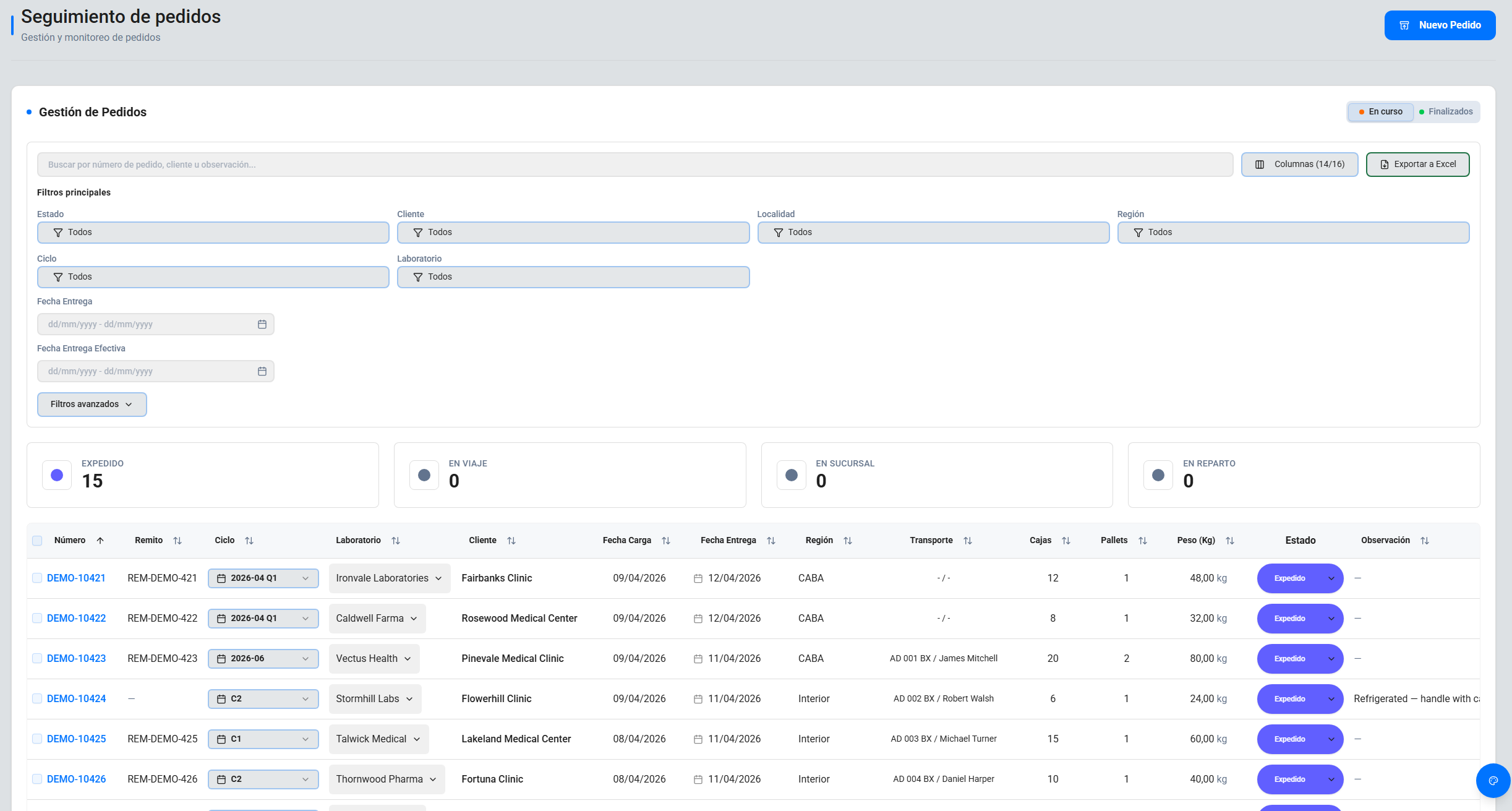
Real-time shipment management: A live shipment board where multiple users can work simultaneously. When one updates a shipment status, everyone else sees it instantly without refreshing the page, with subtle animations to highlight the changes.
Shipment visibility for the client: Client users have their own role with full real-time access to every shipment without having to wait for an end-of-day email. They can check the status, details and the proof of delivery for any shipment.
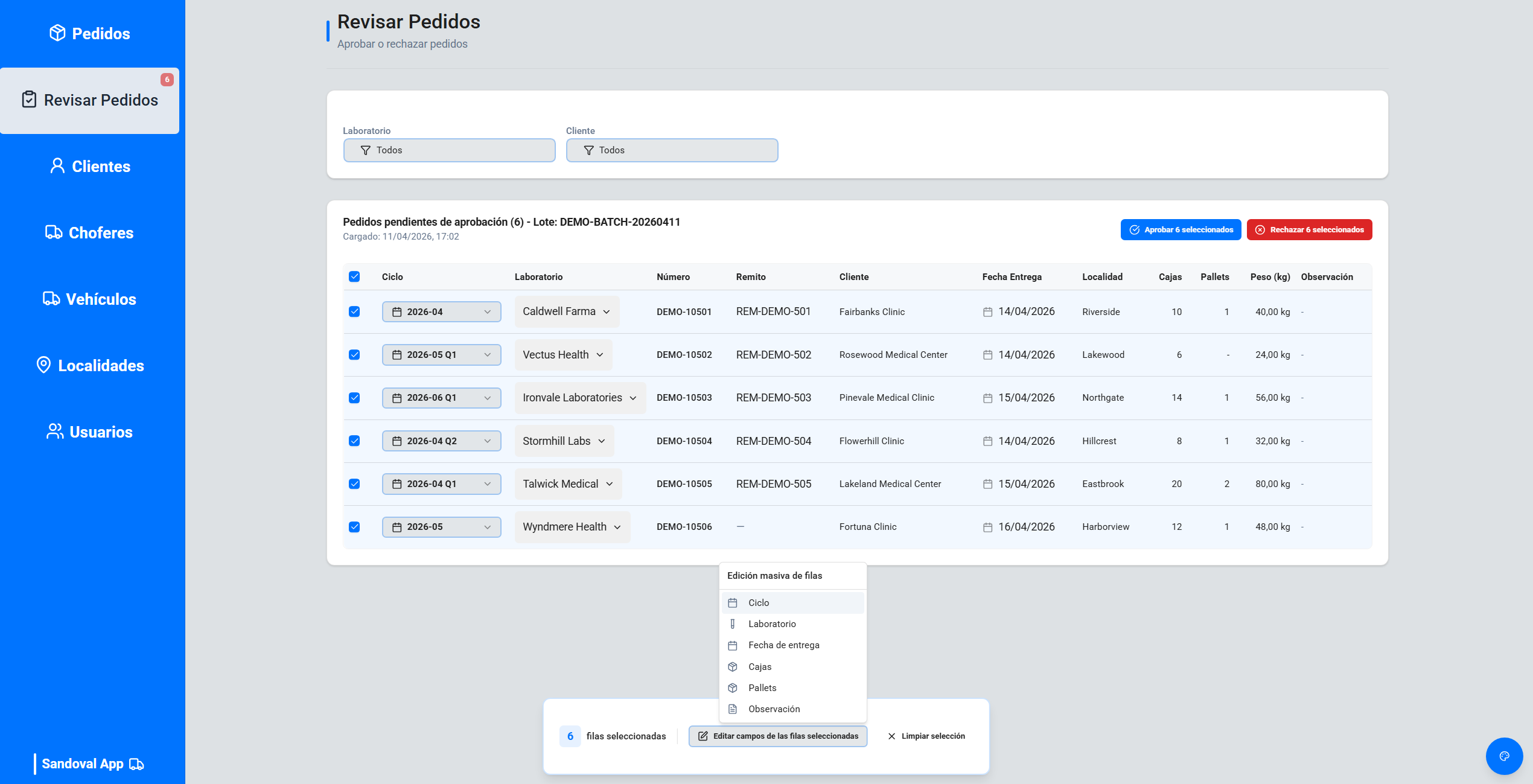
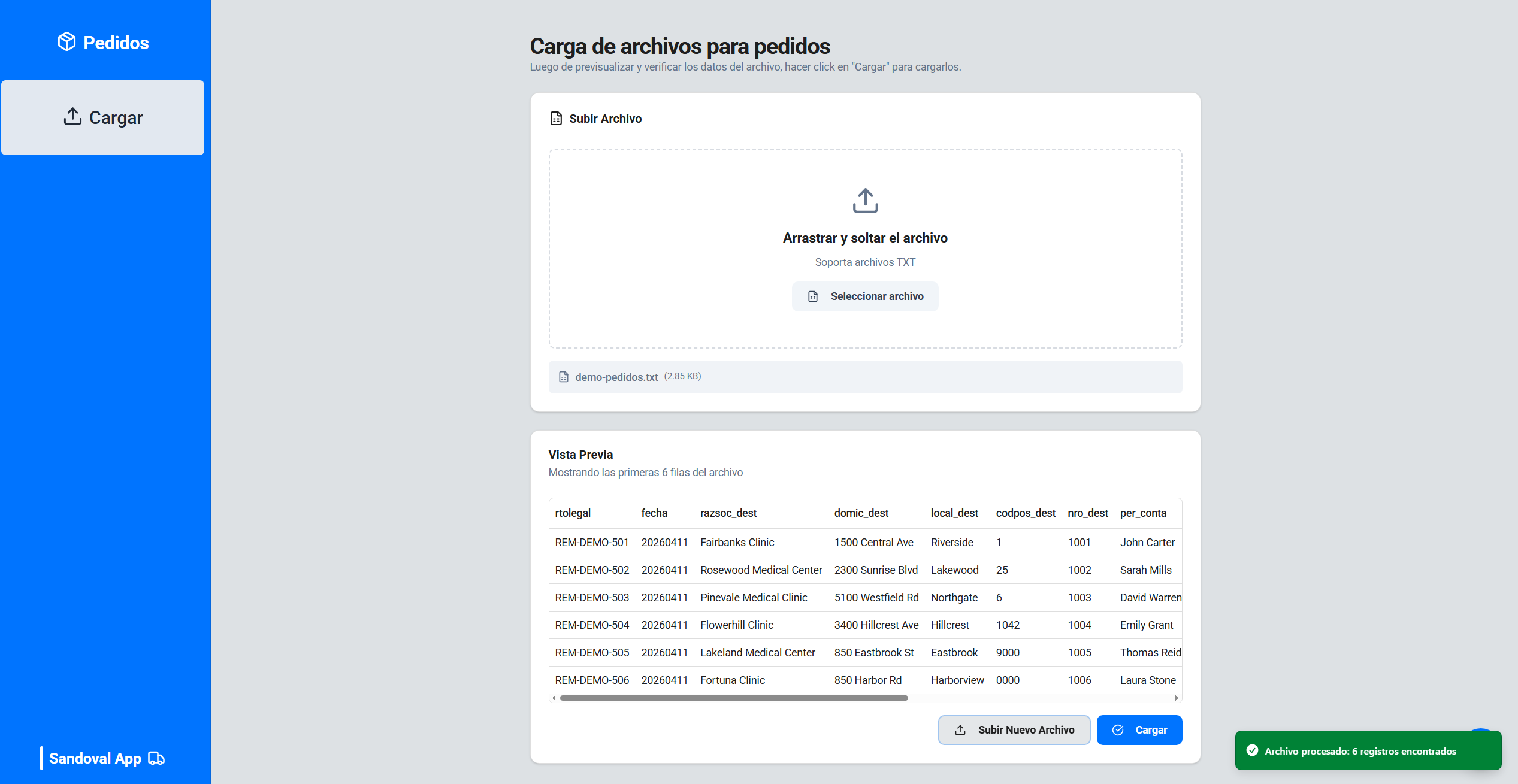
Client file import:The client uploads shipments in a fixed-width positional text file. The spec they provided was partially incorrect: field labels didn't always correspond to what was actually at those positions, and some fields were unused entirely. I cross-referenced the documentation against real files to establish the correct mapping, then built a parser around it. Parsed records land in a staging table where MMS Logística reviews and approves the batch before anything enters the operational flow. This is a deliberate checkpoint that prevents bad data from reaching active operations, and lets MMS Logística know that new shipments were uploaded without having them flood the main board.
Automatic SAP integration:Every status change triggers an automatic notification to the client's SAP system via Supabase Edge Functions triggered by Postgres triggers, with OAuth2 token management, auth caching and call logging for audit purposes. PL/pgSQL functions handle atomic batch approval and duplicate detection.
Digital proof of delivery: Employees upload the delivery receipt directly from the platform when marking a shipment as delivered. This replaces physical paperwork and scattered emails: the client can access the proof of delivery immediately from the shipment details or via an API endpoint.
Master data management: MMS manages their full catalog of clients, drivers, vehicles and localities from the platform, with validated forms and integrated search.
Automated email notifications:When a shipment moves to "out for delivery", the system automatically emails the end customer via Resend.
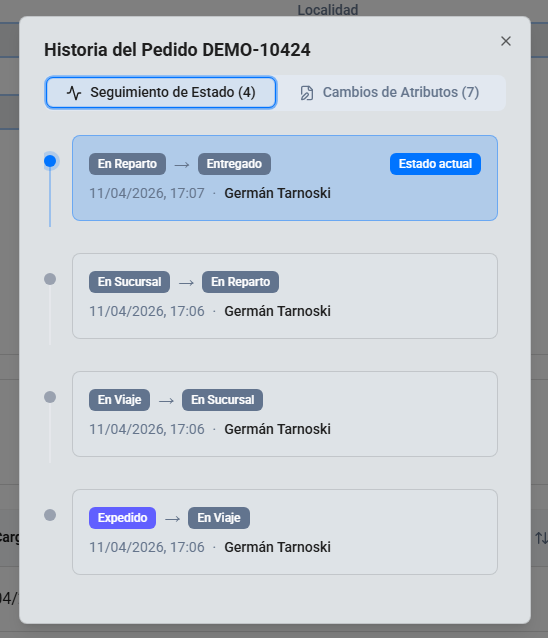
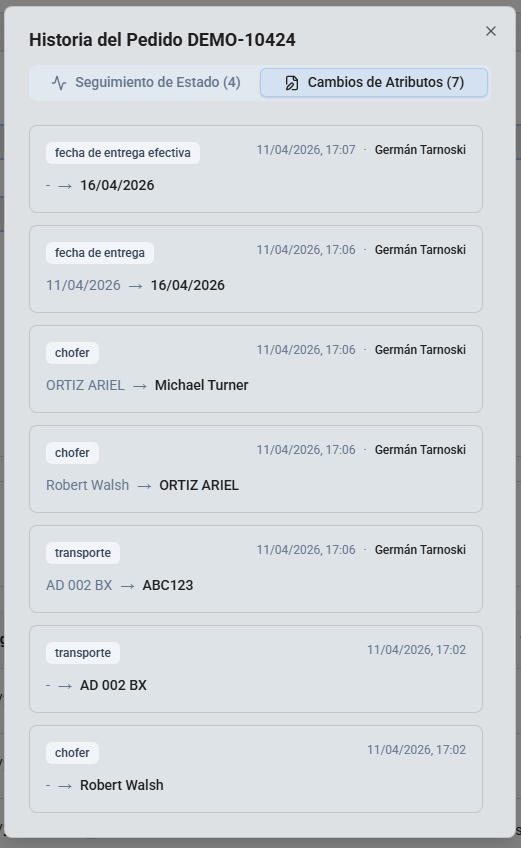
Complete audit trail: Every change to every shipment is logged: which field changed, old value and new value, who did it, and when. The full history of any shipment is accessible directly from the shipment table.
Regional billing module: MMS can filter completed shipments by zone (Buenos Aires vs. interior), apply the corresponding regional rate and generate client invoices.
Role-based access control: The system distinguishes between MMS and client users, with routes and features gated by company and permission level (standard user vs. administrator). New user invitations are managed from within the platform.
03 — Technical Decisions
The project required real-time multi-user sync, file storage, server-side functions, row-level security and managed auth all working together. Supabase provided that as a cohesive stack. I already knew it from prior work, which meant I could move fast without stitching together separate services or compromising on reliability.
Since the project runs on Supabase with no separate backend, Edge Functions are the server-side execution layer. There, OAuth2 credentials can be managed without exposing them to the browser. The less obvious challenge was token consistency under concurrency: multiple shipments can change status simultaneously, each triggering a SAP call, so the implementation needed to handle token reuse and refresh without race conditions.
Three reasons. First, the client handles more shipments than they assign to MMS Logística, so the staging view lets MMS confirm that what's being imported is actually theirs to work with before it enters operations. Second, it makes the intake intentional: rather than shipments suddenly appearing in the live table, MMS explicitly acknowledges the batch. Third, shipments uploaded together often share fields that need to be set uniformly, and this is a good time to edit them all together before they are approved and mixed in with all the other active shipments.
MMS Logística operators had a habit I hadn't designed for: they leave the app open indefinitely. This created two problems: Supabase Realtime pauses subscriptions when a tab is backgrounded for long enough, so users returning after an hour would have a stale view with no indication anything had changed; and when I deployed updates, I couldn't rely on the users refreshing to get the new version. Rather than fighting the habit, I worked around it by adding a focus event listener that forces a data refresh when the tab comes back into focus, and a polling mechanism that checks for new app versions and shows a banner prompting users to reload. I think this is a good example of how production use reshaped assumptions I had made during development.
04 — UX Details
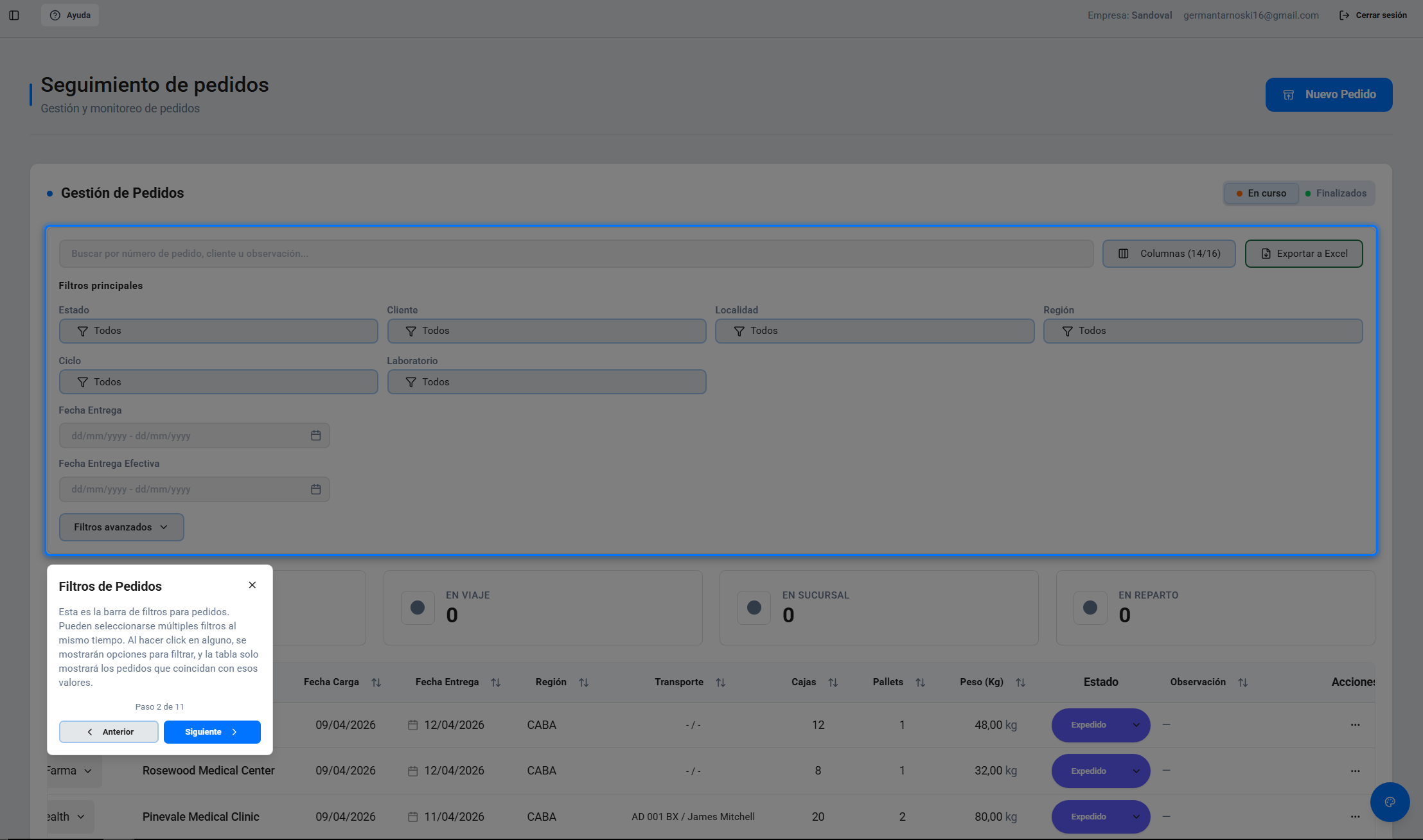
The hardest UX constraint was adoption risk. These were operators who had never used anything beyond Excel. If the platform felt too foreign, they'd resist the switch entirely. Every design decision had to minimize the gap between what they already knew and what I was asking them to do. The onboarding tour was part of that: rather than assuming users would explore on their own, I gave them a guided path so they could learn the platform without formal training. Beyond the in-app tour, I also communicated directly with the team whenever new features shipped, explaining what changed and how to use it.
For more complex workflows: configurable column visibility that persists per user and carries over to Excel exports, optimistic updates that show changes instantly with automatic rollback on error, and live row highlighting when a colleague updates a shipment.
05 — Stack